
robotic thoughts...
May 24, 2010
Presentation Software Options
I have been exploring alternate presentation software options for a little while now. My mission is to find a way to write my slides in a simple plain text markup. There are several reasons that I would want to do this.
My talks are generally on a technical subject, so I want to be able to add syntax highlighting inside my slides. There are ways to do this with Keynote, but it is a pain to manage. I just want to write the code directly in the slide and have the output transform it for me.
If I can write slides in a plain text markup, that means I can check my changes in to a version control repository. I write code most of the day, and writing my presentation in a similar manner just makes sense to me. I would be able to write a single section or group of slides, get to a stopping point and then check in my changes. This means I could later see a diff of what I had done and even quickly revert back to a previous version. Another benefit is that I can check in my changes, switch to another machine or another operating system, and still be able to work on my presentation with no change in workflow.
Aside from the management of the slides, I would be able to collaborate with another person or a group of people. I've actually done this once in practice and it was a rewarding experience. We were able to work on different sections of the presentation at the same time. Then once we wanted to see what the other person had written so far, it was just a matter of updating the code!
The other big advantage is that I don't have to rely on any GUI software to write my slides. I can use vim (my editor of choice) to write my slides on any platform I choose. So far I have been writing my slides in Markdown and have been enjoying the ease of use.
The biggest disadvantage is that you can't get too fancy with your slides. If you want to place text in 10 different places on one slide, then you are really better off using something like Keynote, Powerpoint or OpenOffice Impress.
Here is a roundup of the options that I have used so far.
Slideshow and S9
Slideshow was the first plain text based system that I tried. It works fairly well but has quite a few downsides to it. The biggest disappointment for me was the weak syntax highlighting support. This system requires Ruby 1.8 because of the use of a deprecated library. This threw me off at first, but after that it was pretty straight forward to install.
PROS
- Use Markdown or Textile to write slides
- Can be version controlled
- Nice support for themes
- Open source
CONS
- Bases slides on headers, no way to have a slide without a header
- Default style is quite horrific
- Adding images to a presentation is a pain
- No PDF export option natively
- No way to easily preview changes (requires HTML generation)
- No way to link to a specific slide
- Syntax highlighter supports a limited set of languages
- Syntax highlighting inclusion is dirty
- Syntax highlighting default styles are no good
- No fancy transitions
- No presenter display
- No active development at the moment
Showoff
I first saw Showoff in use while watching Scott Chacon's "Hg and Git; Can't we all just get along?" talk at Pycon. He wrote this presentation software with bigger goals in mind. Right now it is fairly basic compared to the lofty goals that he has set. Out of the box the look of this software is much easier on the eyes than Slideshow.
I thought that this might be exactly what I was looking for, but it fell short in its ability to output the presentation in PDF and HTML formats with my custom theme.
This software also suffered from the same Ruby 1.8 support issue as Slideshow. Neither of the authors warn their users of this fact.
PROS
- Uses markdown
-
Bases slides on
!SLIDEnotation which makes it more flexible - Can be version controlled
- Easy syntax highlighting
- Command line demo mode
- Server based for easy updates
- PDF export
- Nice default style
- Default style is bound to a 1024 x 768 box, the typical projector resolution
- Nice set of transitions using jQuery Cycle plugin
- Open source
- Actively being developed on
CONS
- Applying a theme is not manageable across many presentations
- No way to link to a specific slide
- PDF export requires commercial software
- PDF export breaks easily with custom style
- PDF and HTML export have too many bugs at the moment to be useful
- No presenter display
Keynote
Keynote is the software I've used the most so far. Keynote is very easy to use and has a nice UI that goes along with it.
The biggest gain from using Keynote is the fact that it has a presenter display. None of the HTML based solutions have come up with a solid presenter display. When I'm giving a talk/training to my co-workers, this isn't an issue. When I'm standing in front of a couple hundred people, it is nice to have a visual guide there with you. You can customize the presenter display to show the information you want and in the layout that you prefer. This is really a killer feature.
Keynote also gives you a way to export to PDF or HTML. This is important to me because I want to share my presentation on a site like Slideshare or in a non-Flash friendly way using HTML.
PROS
- Easy to use
- Nice UI
- Fancy transitions
- Nice built-in themes
- Presenter display
CONS
- Requires OS X
- Syntax highlighting is a pain
- HTML export is available, but just generates images
- Not open source
Conclusion
For my next presentation I was going to try and use Showoff. It was looking quite promising until I tried to generate the PDF and accompanying HTML. The support for my custom theme and image handling in the PDF export failed for me. So for now, I'm going to stick with Keynote. My presentation will contain quite a few code snippets so I will be using Pygments to render them into rich text files, then pasting that into Keynote. Hopefully this won't drive me crazy!
Do you know of any other alternatives? Let me know in the comments.
Apr 09, 2010
Avert Your Eyes, I'm Naked
If you happened to find your way on to my site today (April 9th), you might have noticed something a bit odd. That's because today is CSS Naked day. This is the fifth year for the event which aims to promote web standards through semantic markup. I've known about it for a couple of years but have never participated. This year I decided to give it a go.
My site is Plone powered, so I was able to quickly make all the necessary changes through the web. I had planned on making a quick product, but laziness prevailed and the time had already arrived. With that premise, I just used the evil custom folder and friends to go naked.
First I added a quick (script) Python into my custom folder named isNakedDay. Zope's DateTime module makes this pretty easy:
   # The current time in GMT
   now = DateTime().toZone('GMT')
   # Dynamically get the year so this would work next year as well
   this_year = now.year()
   naked_date = DateTime('%s/04/09 0:01 GMT' % this_year)
   # CSS naked day starts 12 hours before GMT
   naked_start = naked_date - 0.5
   # CSS naked day ends 36 hours after GMT
   naked_end = naked_date + 1.5
   return naked_start < now < naked_end
As the website points out, CSS Naked Day is actually two full days once you take into account all the time zones. The code above handles this with some date math.
In Plone's CSS registry, you can add conditions on each of the CSS files. In all the public facing CSS entries I added the following TALES expression:
not:portal/isNakedDay
I also added a warning at the top of the page so people don't think my site is broken. This was achieved quite simply by throwing the main_template into the custom folder then adding the following just above the visual-portal-wrapper:
   <tal:naked define="portal context/@@plone_portal_state/portal"
              condition="portal/isNakedDay">
     <hr />
     <h3>What happened to the design?</h3>
     <p>To know more about why styles are disabled on this website visit the
     <a href="http://naked.dustindiaz.com" title="Web Standards Naked Day Host Website">
     Annual CSS Naked Day</a> website for more information.</p>
     <hr />
   </tal:naked>
Now the site is properly naked. Since the isNakedDay script will run a bunch of times on each page load, I added it into the RAMCache via the Cache tab on the script object. The RAMCache defaults to one hour, so that works out perfectly. Plone FTW!
Sep 20, 2009
MacBook Pro Triple Boot With Arch Linux, XP and OS X
We just hired some new people at Six Feet Up which means we had to buy new laptops. Every once in a while I will assert my seniority and upgrade to the latest and greatest Apple hardware and pass mine on down the line. This time around the hardware I couldn't resist was the unibody MacBook Pro. I love the look and the feel of it. I had been putting off re-installing and upgrading the hard drive in my old MBP for a while. Procrastination pays off again! Installing the 320GB drive in the unibody MBP took all of fifteen minutes.
The reason for the HD upgrade was two-fold, one was a slight bump in performance (7200 RPM) and the other was obviously storage size. Recently I have become less impressed with OS X as a development platform and have been wanting to try another OS. We have a few people at the office that are running Arch Linux and our summer intern showed me some pretty cool features of the OS. I liked the Arch philosophy and it looked like a good candidate for a dev platform.
Now this is where the 320GB HD comes in handy :)
The Triple Threat
I had seen my fellow colleagues dual booting into OS X and Arch Linux. They were using reFit as a boot loader and I was pretty impressed with the set up. Having been a long time Parallels user, I also remembered that it could take a bootcamp partition and use it as a VM in OS X. Thus the dream was born, the triple boot: OS X, Arch Linux and Windows XP.
Having just received a copy of Snow Leopard I decided it was finally time to re-install and give my OS X installation a breath of fresh air. So first things first, I created a clone of my drive with Carbon Copy Cloner and proceeded to google around a bit to find some hints on how to install all three OSes on my MBP.
I ended up using several different sources to get started. First was a blog entry that covered the most of the information that I needed. Of course it was aimed at using Vista and Ubuntu so I had to interpret it slightly. Looking back at it, there is still one thing I need to do, set up a swap file.
Update: I found a nice how-to about how to set up swap space on linux (quite old but still relevant it seems). Here is the gist of what I ended up doing:
$ sudo mkdir /work
## make a 1GB swapfile
$ sudo dd bs=1024 count=1M if=/dev/zero of=/work/swapfile.1
$ sudo mkswap /work/swapfile.1
$ sudo swapon /work/swapfile.1
Then add the entry at the end of your /etc/fstab so that it gets created on boot.
$ sudo vim /etc/fstab
...
## here is the swap file entry
/work/swapfile.1 none swap pri=5,defaults 0 0
You can add more swap as needed by adding more swapfile.n files. I had to go in later and add a total of 6GB (double my RAM). end update
Second I used the AchWiki page dedicated to the MacBook to setup the Arch Linux side of things. The ArchWiki is quite impressive and is loaded with useful information. Sometimes you have to use several pages to really figure out what is going on, but overall it's pretty concise. One handy tip was to change the UID and GID of your OS X account before using it so you can line it up with the same IDs in Arch Linux, thus making sharing home directories easier. One extra step that was needed was to create a new 'group' in the 'Accounts' preference pane in OS X so that my group showed up with a name and not just a GID.
Live and Learn
I learned a few valuable lessons while installing everything. The first lesson was realizing I should have read the bootcamp docs before I started. There is some helpful info in there including the fact that you have to use XP SP2 or higher to install. All I had lying around was an original XP Pro install disc. I attempted the first install with that disc and ended up nuking my OS X install since only one partition was showing. Common sense should have prevailed here, but I was in a hurry. A download of SP3 and a re-install of OS X later and I was back on track.
GRUB
The biggest pain I had while installing the three OSes was accidentally installing GRUB directly onto /dev/sda. Both the tutorials I was using told me NOT to do this, but apparently I was in opposite day mode. The GRUB install had the immediate effect of not allowing me to boot into Windows but still but still able to boot OS X. I was still able to boot into Arch Linux via the GRUB screen. As an interim fix, I added windows to the GRUB config file. Arch Linux sets up a windows partition example, I just had to change the partition number.
I finally got around to backing up my OS X partition so I was able to try fixing the situation (and potentially borking all the installs). First thing I tried was to use the XP install CD. Which included following these steps:
- Boot up with the Windows install CD
- Go into recovery mode
- Select windows install (usually number 1)
-
Run the FIXMBR program from the prompt:
C:\> FIXMBR
This didn't quite fix the issue, Windows would now just boot up to a black screen and Linux wasn't an option from reFit anymore. After some more googling around I was able to find a post with a potential fix on the Apple support forums.
I booted up into single user mode to fix the master boot record.
# fdisk -u /dev/rdisk0
new MBR [y/n]: y
This fixed it, now I was able to boot into OS X and XP! I'm not sure if the FIXMBR was required or not, YMMV. Next I just had to re-install GRUB on the linux partition. I used the steps on the Arch Linux wiki about re-installing GRUB and installed it into the same partition as my Linux install (/dev/sda3).
Now reFit shows and boots into all three OSes properly. Success!
Bootcamp and Parallels
Next objective was to get the bootcamp partition working with Parallels. I chose to use NTFS for my XP install. Snow Leopard can read this by default, but it doesn't read and write by default. I found a little snippet on a MacFUSE forum somewhere that showed how to turn on the native read write support in Snow Leopard. Here is what I had to do.
Get the UUID of the partition with Windows installed on it (my XP install is on the fourth partition)
$ echo `sudo /System/Library/Filesystems/ntfs.fs/ntfs.util -k disk0s4`
6369b368-57d8-46e6-80c6-e6ac095fb604
Use your favorite editor to modify the fstab.
$ sudo vim /etc/fstab
Then add the following (replacing your HDs UUID)
# bootcamp partition in read/write
UUID=6369b368-57d8-46e6-80c6-e6ac095fb604 none ntfs rw
Next time you boot up you will have an NTFS partition that is read write in OS X. The rest of the Parallels install was straight forward. Now I can use my XP boot partition as a VM in OS X!
Final remarks
I'm quite excited to have three bootable OSes on my laptop giving me the best of all worlds! I learned a lot about boot loaders during this exercise as well. Though I'm still a bit hazy on how this works with reFit. Whatever you do, DO NOT install GRUB into /dev/sda! This set me back a couple days since I was using the laptop for work purposes as well.
Next step for me is to get OS X to recognize the ext3 partition and for Arch Linux to use HFS+ read write. None of the MacFUSE modules and ext3 helpers seem to work on Snow Leopard at the moment. Anyone know of any working solutions out there for Snow Leopard?
Update: I was able to mount the ext3 filesystem with fuse-ext2 using the following commands.
$ mkdir /Volumes/ARCHIE
$ sudo fuse-ext2 /dev/disk0s3 /Volumes/ARCHIE -o force,allow_other,volname=ARCHIE
This mounts the FS at the /Volumes/ARCHIE folder with read write capability and names the volume ARCHIE. One last thing that I haven't figures out is how to get this to work properly in /etc/fstab in Snow Leopard. end update
Jun 10, 2009
Launcher Showdown: Quicksilver vs LaunchBar
A good app launcher makes all the difference in the world to me. It is really painful when there isn't one available, "How the hell do I open an application?!?!". On OS X there is always the Spotlight functionality, but that has never satisfied my needs. I need to be able to manipulate the item from the launcher, not just open it. I guess "launcher" is a really bad term for it, in reality it's a "do a bunch of awesome stuff thingamajig", but that's not easy to say.
Quicksilver has been my "launcher" of choice for quite some time now and before that I was using Butler, which I originally tried out because of its clipboard implementation. Quicksilver was recently open sourced, since the lead developer now works for Google and their launcher product called Google Quick Search Box. This was pretty much the beginning of the end for QS. While there are still some folks working on the open source version, it has been a slow process.
I recently overheard Andi Zeidler talking about LaunchBar on Twitter, so I decided to give it a try. That has turned out to be an excellent choice. Quicksilver has been plagued with some really strange issues for quite some time. Most of them are bearable, but sometimes it can be really annoying when you are trying to get something done fast. In the week and a half that I've been using it, the program has really exceeded all my expectations. So what makes it better?
LaunchBar Pros
There are a lot of really nice features in LaunchBar. Here is a rundown of some of the features that make it one of the best I've used.
- Web searches are quoted properly, you can search for "Bob Marley & the Wailers" and get the proper results
- Setup of LaunchBar is orders of magnitude easier than Quicksilver. If you've ever set up the clipboard and shelf in Quicksilver then you know what I'm talking about.
- The default setup of LaunchBar makes much more sense, which is helpful for n00bs
- The clipboard in LaunchBar is really nice
- It doesn't assume that everything with a dot in it is a URL
- You can access each line of a copied item from a sub menu
- The clipboard menu tells you where the item was copied, and how many characters and lines it contains
- You can merge multiple clippings into one by using the ClipMerge functionality
- Using the OS X services menu items in LaunchBar actually works. This makes things like WordService useful again!
- LaunchBar is really fast compared to Quicksilver
- LaunchBar doesn't randomly forget its settings like Quicksilver would with the actions sometimes
LaunchBar Cons
While it has been an overall positive experience, there are still some things LaunchBar could learn from Quicksilver.
- No custom triggers. This was one of my favorite things about Quicksilver. You could assign a keyboard shortcut to any "subject, verb" action. LaunchBar does not have this concept. It has "abbreviations", but it's not the same. I liked to be able to type "ctrl + option + cmd + l" and go to the login window. You can still do this in LaunchBar, but it takes more keystrokes.
- No social bookmarking support. Quicksilver has a nice delicious integration that allows for the indexing of all your bookmarks and their corresponding tags. I used this feature A LOT. My brain is on the web, Quicksilver helped me query it very quickly.
- LaunchBar doesn't have the concept of plugins like Quicksilver does. If it isn't there, then your only option is Applescript. Applescript sucks.
- LaunchBar doesn't have the concept of a persistent clipboard or shelf. This is another feature from Quicksilver that I use A LOT.
- Running unix executables from LaunchBar requires an open terminal window. Quicksilver can do these tasks in the background. LaunchBar has the ability for these scripts to be placed in the "Actions" folder. However, you have to have a property list file next to it that tells LaunchBar to run it in the background. This is less than optimal, especially for pre-existing executables.
- LaunchBar doesn't have the same "comma trick" as Quicksilver does. I rarely use this feature, so it's not a big deal for me. You might be able to exchange some of the behavior by using the ClipMerge facility in LaunchBar.
- With LaunchBar, you really need to read the docs to get the most out of it. There are a a lot of hidden gems in the form of keyboard combos. With Quicksilver it was usually pretty self-explanatory how to do things. Luckily the LaunchBar docs are very informative.
- You can't start entering text like you could with Quicksilver by presssing "." and typing some text. LaunchBar has an "Enter Text" action that allows you to do something similar. Someone in the forums suggested that you assign "," to the "Enter Text" action. This works out well.
- Performing "actions" on the "subject" are not as easy in LaunchBar. For instance, there are usually some actions hidden in the context menu of the item, you can right click or use a keyboard combo to open it up, but that's kind of a pain
Conclusion
In my humble opinion, LaunchBar is the best launcher out there right now. It could still stand to learn a few things from Quicksilver. But overall LaunchBar is the superior application. Hopefully there are devs watching the LaunchBar forums that will implement my requests :) While I wait for them to be implemented, I'm using a stripped down Quicksilver that just contains the delicious and shelf plugins to fill in for that missing functionality of LaunchBar.
If you haven't given a try yet, I strongly recommend you download a trial of LaunchBar 5 and take it for a spin.
Apr 18, 2009
LaCie 1TB Big Disk Drive Failure....Or Not
There are days when you just have to say, "I fuckin' love the internets!!", more on that in a minute. I bought a LaCie 1TB Big Disk a couple of years ago and it slowly became my "everything disk". The only problem with this external drive is that it is setup in a RAID 0. This means that the data is 'striped' across two 500GB drives for performance. But, if one drive fails then you lose all your data!
Very recently the drive decided to start making some strange noises while struggling to start up. The drive would also emit a loud hissing noise while running. This started to freak me out since I had nowhere to back up 1TB. I debated a while and then bought a Drobo last week! Now I have 4TB usable on the local network :)
After playing around with the Drobo I decided it was time to fire up the LaCie and back it up. Sure enough the LaCie drive failed to mount. It sounded like it really wanted to but it just couldn't. Sadness!
My first google on the subject was "lacie big disk extreme sucks" (realizing later mine was not 'extreme'). The third hit was a blog post entitled LaCie Big Disk Extreme Failure. Now this is where the love of the internet comes into play. The post had around 100 comments on it. Two of them described what was happening to my drive perfectly. The first describing the startup woes:
problems included; bad booting up, clicking noises, freezes and a complete failure to mount (link)
And the second:
The power supply adapter a made high pitch sound (not very noticeable unless up close) and upon opening the board had burnt brown areas and the capacitors where bulging out the tops. (link)
I had not noticed this noise coming from the power adapter, but low and behold mine was making the same sound. So what was the solution in the end? A new power adapter. WTF! Internets FTW! I decided that I'd shell out the $30 on the chance that it might work. Power supply arrived yesterday, and now my drive is fully functional and backed up to my Drobo!!! Happiness!
Feb 25, 2009
A Comic For Those Who Run Buildout Regularly
If you're a geek of any sort then you have probably run across the wonderful comic xkcd. It's one of the few comics that I read on a regular basis. There was a comic that ran a while back about compiling code that doesn't quite relate to us Plone developers. Since the comic is released under a Creative Commons license, here is the re-mixed buildout version :)
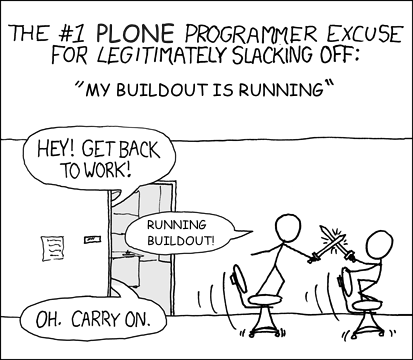
Now there's no reason to be ashamed of surfing the net or sword fighting in the halls while your buildout is running!
Feb 11, 2009
Taming My $SHELL
I've been using the command line in various ways for a long time. Back in the DOS days it was the only way. Then windows came along, but there was still the need for a little 'cmd' action every once in a while. It wasn't until I started working at Six Feet Up that I re-kindled my love affair with the command line. This time around it was with unix and primarily ZSH.
I started out at Six Feet Up doing customer support and systems administration. This required learning a new skill set, the command line. As I made the transition from sysadmin to web developer this skill set transferred over quite nicely. It took me a little while to realize that all the things I was doing on the command line could be turned into shortcuts. My first run in with aliases involved the 'ls' command. Normal 'ls' output leaves a lot to be desired (especially for a n00b).
$ cd
$ ls
Applications Desktop Documents foo.txt Library runme
Ok, so foo.txt must be a file, but what the hell are all those other things? This is easily solved with some extra options that denote the type of item and color code things.
$ ls -GF
Applications/ Desktop/ Documents/ foo.txt Library/ runme*
Now it's clear that foo.txt is a file, runme is an executable and everything else is a directory. But who wants to type that every time? Not me. So what do we do? The solution is to modify your shell's startup files. In my case I would just add an alias to my .zshrc.
alias ls="ls -GF"
Now when I type 'ls', it automatically adds the options in for me. This is old hat for a lot of command line hackers out there. For n00bs like I once was, this was a gold mine. I just recently published all my configuration files on github for mass consumption. This is the culmination of years of tweaking and prodding.
Once you get used to the comforts of a well defined set of user conf files you can never go back. This became a problem for me when Six Feet Up's hosting business started to really take off. Suddenly instead of five machines, we had ten, then twenty and more on the way. The obvious problem here is keeping all your shell customizations in sync. Luckily we have subversion configured on most of the machines.
At some point I had the bright idea to put all my confs into subversion. This made it really easy to get set up on a new machine.
$ ssh some-machine

Welcome to Some Machine!
$ svn co https://svn.example.com/svn/claytron/dotfiles .dotfiles
$ ln -s .dotfiles/.zshrc .
Now I could have the same .zshrc file on all the servers fairly easily. With this setup, if I modified the conf on one server, then I could get the updates on the others. This worked well for a while. Then I started adding all my other confs into the mix. Settings for vim, screen and readline got added in. Now I had to go to each machine, update the checkout and symlink any new confs into my home directory. The solution for this slowly evolved into a shell script.
The current version has advanced in many ways since the original and has taught me a lot about shell scripting. This has solved the symlinking issue for me.
The only other problem is keeping up to date. I would log into a machine and never even think about updating the .dotfiles dir to get the latest settings until something was missing. Then another lightbulb went off. Why not update them automagically? This is when I decided to put some code in to run an svn up on the .dotfiles dir each time I logged in. Here is what the current code looks like. It works like a charm for me in our environment.
The confs that are up on github now reflect all these trials and tribulations. They also blend bash and zsh together for me. I figure at a minimum most machines will have bash installed. So I went through and put all the 'common' elements into common files and put all the zsh or bash specific stuff into the respective startup files. Github also allows for an easy way to download my files in a tarball if I don't have access to svn or git. Github has continually impressed me since I started using it.
Now I'm ready to take over the world on almost any machine I log into :)
Jan 24, 2009
AppleScript + Party Shuffle Pt. II
We're back for another round of AppleScript and Party Shuffle. Last month I wrote about adding missing party shuffle features using AppleScript. I noticed that there was one issue with the scripts. If you selected an album that had multiple discs then it would add all the discs to the party shuffle ordered by track number. So for example, you have an album that has two discs with three tracks a piece. Then you would get this:
Disc One Track 1
Disc Two Track 1
Disc One Track 2
Disc Two Track 2
Disc One Track 3
Disc Two Track 3
This is obviously not what we wanted. I spent a little time today updating the scripts so that they behave correctly. Now if you select the same album as our example above this is what you will get:
Disc One Track 1
Disc One Track 2
Disc One Track 3
Disc Two Track 1
Disc Two Track 2
Disc Two Track 3
This of course assumes that you have properly set up the disc number and disc count for your tracks. I'm pretty anal about this kind of stuff, so my library has them all set (even Disc 1 of 1). If the disc count is not set then the script will assume that there is only one disc and won't go through the disc sorting routine. You can get the latest scripts here:
Jan 12, 2009
Naptown Roller Girls Third Season Begins
It's finally here!!!! The third season has started for the Naptown Roller Girls. Last Saturday our Tornado Sirens hit the track and faced off against the Steel City Derby Demons. I've been trying to do my part in promoting the team through all my social networks, upcoming and eventful. I don't think they really needed my help since the home opener's online tickets sold out a day or two before the bout. On game day there were only paper tickets left at the box office, which also eventually sold out. Luckily my wife and I bought season tickets this year! None of our friends bought tickets before hand, so we showed up when tickets went on sale at five to make sure they could get in. We were probably some of the first fans to show up. The crowd really started to gather around quarter to six. We grabbed a spot in line so that we could get first pick of suicide seats. In three seasons of derby action, this was my first time in the suicide seats. We ended up getting a nice spot in the third turn. But alas, no roller girls ended up in our laps.
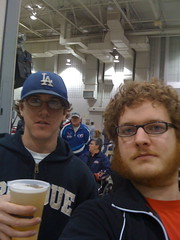 As we settled into our seats the first order of business was to get some beers. I was surprised to find that there was a nice selection of imports and micro brews on tap! Roller derby just got that much sweeter. In addition to the usual Bud and Bud Light they had Stella Artois, Red Hook ESB, Goose Island Winter Warmer and something else that escapes me at the moment. While waiting for the bout to start I noticed there was a new scoreboard set up. At first glance it seemed to be an improvement. But once the bout started, it was hard to read the time remaining. This season brings some other changes with it as well. The bout is now divided into halves instead of periods. There are also a few other changes to the rules. But by far the biggest change this year for the Sirens is their uniforms. They've switched to a sportier red and black jersey and ditched the Jerry Lee western style shirts. I'll miss the old uniforms, they were so freakin' cool!
The Sirens jumped out to an early lead at the beginning of the first half and the crowd was at fever pitch. You could feel the excitement brewing in the air. 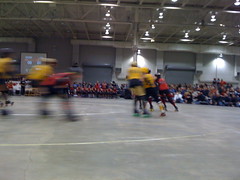 They went back and forth a bit and then the Derby Demons hit their stride. They grabbed the lead and never looked back. Just before halftime, the Derby Demons put up a twenty point jam that the Sirens couldn't overcome. They went into the half down thirty points with the score 55-25. Despite our team getting crushed the crowd was still energized most of the second half. The final score ended up being 99-44 in favor of Steel City. Just as you could feel the excitement in the first half, you could sense the disappointment at the end of the bout. Luckily we have lot's more derby action coming up! This year the Sirens are joined by their junior varsity team the Warning Belles. The next bout will be the debut of the new JV team. There will also be two double headers this year featuring the Warning Belles and the Tornado Sirens!! It's going to be a fun season, get your tickets and join us!
Dec 29, 2008
Upgraded to Plone 3.1.7
Last night I bravely decided to upgrade claytron.com to the latest Plone release. Luckily I already converted it over to a buildout based install a couple months back. This was pivotol in my speedy migration effort since it allowed me to switch products in and out so effortlessly.
This site is fairly simple since I'm only using a couple add-on products. Quills is the primary product I use. The old site was running Plone 2.1.4 and Quills 1.5 RC3. I tried to go directly to 3.1.7, but the portal_migration failed. Rather than try and debug that nasty error, I decided to migrate to the latest 2.5 release first. This was a complete success!
Next, I updated the buildout with all the Plone 3 compatible versions of the products. Then changed the plone recipe to point to the latest 3.1.x release. After that, I ran the buildout and started the site back up. Now it was time to try the portal_migration again. It blew up again, but with a less painful error. Quills 1.6 and above no longer uses a custom workflow and therefore made something unhappy. All I had to do was set the weblog types back to the default Plone workflow and try again. This was a success!
Next up was the Quills migration. This is automatically run while quickinstalling Products.Quills in the portal_quickinstaller. No issues here either. There are some Quills artifacts that have to be removed by hand including the quills_tool, RPCAuth, blog archive folder and blog drafts folder. Also, I didn't like the way the beta of quills.app handled the addition of the portlets to the weblog. It's currently creating a new 'category' of portlets by interface that has no way of managing them through the Plone interface. I posted a hint on the Quills dev list on how to remove them via a debug session.
Lastly I needed to update my custom theme. I moved all my main_template customizations into custom viewlets. Any template overrides were re-integrated using z3c.jbot. Then I removed my Install.py in favor of a GenericSetup profile. That was it! Now I'm ready to upgrade to Plone 3.2 when it gets released in the not too distant future :)
Now that I'm on the Plone 3 series I was able to quickly install CacheFu via an egg. That should help my site's performance quite a bit out of the gate. I also installed the python markdown package and added the transform so I can write in plain text anywhere in Markdown, then copy paste into the site. Thanks to tomster for evangelizing it, I was sold after reading the philosophy and synopsis. This post was written in Markdown, and hopefully many more... :)
Dec 11, 2008
AppleScripting Missing iTunes Party Shuffle Features
My name is claytron and I'm a party shuffle addict. There, I said it. In my opinion the iTunes party shuffle feature is pure awesomeness. I have been using it like mad since it was introduced. I'm still amazed when I talk to iTunes users that haven't used it.
My typical modus operandi is to set the party shuffle to a rated smart playlist (3 stars and up or 4 stars and up). Then if i want to add an album in the mix I can select it and 'Play Next in Party Shuffle' or 'Add to Party Shuffle'. This is where AppleScript can come in handy. Doug Adams wrote a nifty little AppleScript that allows you to select a track and add that track's album to the party shuffle! This really comes in handy when my eMusic downloads arrive in iTunes. I can sort my library by 'Date Added' and then select a track from one of the newly imported albums and have it start playing next in the party shuffle. Totally effing awesome.
So herein lies the next issue. Let's say I just downloaded five albums and imported them into iTunes. You would think you could highlight a track from each album and then use the 'Play Next in Party Shuffle' script. But instead it pops up with a selection dialog with all the albums in your library. For me this is completely useless, I have 2000+ albums. So I went ahead and modified the script to add the album for each selected track.
After doing so I emailed Doug about the modifications. As you might guess, he gets a ton of emails with modifications and fixes for all the scripts posted on his site and can't possibly include them all. I also don't think he quite understood the purpose of the modification. But since most of the scripts are licensed under the GPL you can still benefit from my mods!
There are two scripts. The first one is the 'Play Album(s) Next in Party Shuffle' which allows you to select one or more tracks and have each track's album be cued up next in party shuffle. The second script is 'Add Album(s) to Party Shuffle' which does the same thing except it adds the album to the end of the party shuffle. That way you don't have to add an album in the middle of another!
Both of these scripts require that the party shuffle is currently playing. I couldn't find a way around that in AppleScript (but I'm still an AppleScript n00b). The only other item to mention is that I added a property to the top of each script called 'show_party_shuffle'. If this is true then you'll be taken to the party shuffle after adding the tracks. If you don't want to be switched over, you can set it to false.
Oct 03, 2007
Here kitty kitty kitty
Cat macros are pretty damn funny. Especially when combined with other internet memes like PostSecret. I was playing around with skitch and decided to modify a cat macro to make it funnier...

Jun 28, 2007
A lost treasure
There was a little poem I wrote a couple years ago that I thought I'd lost due to a backup malfunction. While backing up some old jam session and song idea projects I happened to stumble across it.
a golden tongue not full of words

after nine one may wonder
why eel etch the sky
get your twelfth ear through the tube
rome intense hiss desert
Not the greatest poem ever, but greatest title....maybe.
Jun 12, 2007
Randomly precise thoughts
I haven't blogged in a while. Time is not permitting. Went camping last weekend and tried out my new hiking boots. They kick much ass. Aircraft aluminum lacing system was an excellent idea. Listening to The Joggers right now. Good shit. Isn't cake supposed to have a rarities album out some time. I just bought a bunch of other music from eMusic and iTunes. Hopefully just as pleasing. I'm searching for a new car. My eye is on a Volvo 850 wagon. If i'm lucky a '97 T-5 with low miles and a low price will show up soon. I should upgrade this site to use Plone 3.0 (but i'm not sure if Quills is ready for that). /terminate rambling.
Apr 22, 2007
Long live the roller derby
I hope that the current roller derby revival lasts a long time. Lucie and I witnessed our first bout tonight and it was a blast. Now you're saying, "Why the hell is he talking about roller derbies? Didn't that sport die a long time ago?". It did die. Now it is breathing new life and governed by the Women's Flat Track Derby Association (WFTDA).
If you are living in Indy (or any other city with a derby team) you have to check this out. Our very own Naptown Roller Girls put the smack down on the Hard Knox Roller Girls tonight. Things were looking bleak for a few minutes but the Tornado Sirens (Naptown Roller Girls) pulled out to an 18 point lead at the second intermission. They held on to win by 3 points in the last Jam. At one point one of our girls (Touretta Lynn?) threw one of the Hard Knox girls (black-n-blue) down and a fight broke out between them. The Naptown coach ran over to break it up and was then thrown out for doing so. If that wasn't crazy enough the coach came back over and threw a chair into the rink and proceeded to get into a fight with one of the refs! This was pure madness. Finally the dust settled and all was right in the world again except that black-n-blue should have been thrown out.
This is the NRG's first season and it's been a pretty good one so far as I can tell. I'll see you all at the next bout on May 12. Go Tornado Sirens! I'll be yelling the loudest for Jane Ire #1984 because she was totally kicking ass against Knoxville. J. Roller #420 is in a close second.
Feb 02, 2007
MacFUSE makes sense to me now
There has been all sorts of excitement about Amit Singh's MacFUSE product recently on the internets. For the life of me I could not figure out why. Amit went ahead and cleared all that up for me in his Macworld 2007 talk titled "Taming Mac OS X File Systems".
The thing that really got me excited about this technology is the interweaving of the web and your computer. When he started showing of the DocsFS I was sold. The PicassawebFS was quite interesting as well. I wonder if the same thing would be possible with Flickr?
Jan 20, 2007
Quicksilver ate my baby!
Ok so maybe no small children were eaten but Quicksilver is a very impressive app. I finally decided to give it a try a couple weeks ago and I'm still playing around with all the features. It took about three days until I could drop Butler and now I'm using QS exclusively. I had most of my Butler functionality set up within minutes. Triggers (keyboard shortcuts) for sleep and logout were a snap (using the extra scripts). The only difficult part was getting the clipboard history (pasteboard) to show up. I enabled the plugin but had to refresh the catalog for the Shelf & Clipboard. (UPDATE: Apparently you need to access the shelf and the clipboard before you can catalog them and use them via the QS menus. To do this, go to the QS menu -> Plug-Ins (underneath help) and then open them up) The last piece for me was getting custom pasteboards working again. This is where the shelf comes in handy. You can create a text clipping and send it over to the shelf for safe keeping and then access it via the QS menu (or via a trigger for the Shelf which I also have set up).
The possibilities really seem limitless for this app. I keep running into more and more excellent tips and tricks. Here are some links to help you on your merry way.
- Howard Melman's manual for QS.
- Nick Santilli over at The Apple Blog has been doing some good writeups and screencasts on the subject.
- Screencast of how to get started from scratch (this one is a little old but gives you a good idea of how to get rolling)
- His latest was a really simple but effective tip about using Quicksilver and the Finder together.
- Screencast about the Clipboard features
- Screencast about how to use the catalog
- Another screencast about using scripts
- If you are feeling really geeky/social you can use Twitter + Quicksilver
- An enhanced iCal event and todo creator write up over at Hawk Wings
I have also been busy hacking away trying to make QS do my bidding. I wrote a little script that can open a terminal in iTerm for me based on my bookmarks. I've run out of sensical ctrl + cmd shortcuts so this fits the bill nicely. Now all I do is invoke QS, type single quote to go into text mode, type my bookmark name and then tab over to select my 'iTerm Tab.scpt'. Here is the code for the script. Just copy it and paste it into a file and save it as 'iTerm Tab.scpt' and put that script into your '~/Library/Application Support/Quicksilver/Actions' folder (create it if it doesn't already exist)
using terms from application "Quicksilver"
	on process text thetext
		if thetext is "" then return 0

		tell application "iTerm"
			activate
			-- talk to the first terminal
			tell the first terminal
				launch session thetext
			end tell
		end tell
	end process text
end using terms from
Oct 31, 2006
i just bought a house
The first house I stepped into is the one that I bought. Here is what it looks like:
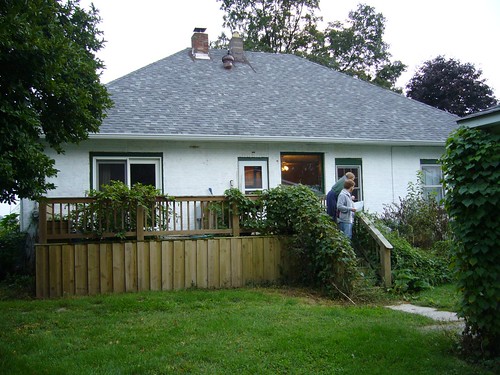
It was completely full of junk. The basement was in utter chaos. The stench of thirty year old canning jars has removed from the property. The animal stained carpets have been lifted. It now lies bare and ready for a new awakening.
Hopefully I'll be able to move in some day. More pictures to come from the renovations that are ongoing. Right now I'm busy writing this entry on my new blackberry pearl. Google maps is the greatest invention ever.
Oct 19, 2006
Canadian 'rock therapy' at the Vogue
Sep 04, 2006
Music makes the world go round
A lot of music has been making it's way to my computer lately. One album (which I bought at Fnac in France and was really overpriced) is the self titled album from Feu Thérèse. They are a French Canadian outfit on the same label as Godspeed You Black Emperor. The first track, Ferrari En Feu (Ferrari On Fire), starts with three minutes of what sounds like a psychedelic version of Pole Position. Then it breaks into a coherent song which isn't too bad. It's got a kind of cheezy organ playing and drums and then a semi distorted guitar comes in and some other instruments follow. Interesting track but not the strongest on the album. The second track has a much dreamier quality to it. There is a whispering kind of sound in the background and some nice guitar sounds. Very strange album indeed.
I also got that Gnarls Barkley album which continues Cee-lo's trend of good music. That guy has such an incredible voice. Just makes you want to listen for ages. Let's see, I also acquired two Tunng albums which are pretty decent. If you like The Books then you'll like Tunng. The song Engine Room off of Comments of the Inner Chorus is probably my favorite. The vocals are haunting and the background music complements the voice very nicely.
I grabbed The Coup's (the coop if you are Black Thought) new album and was a bit disappointed. I think it's one of those albums that I will really appreciate later because I was expecting something completely different. It's always nice for an artist to slap you up side the head with something you weren't expecting. But I just haven't been diggin' this new material. My Favorite Mutiny is the first cut I heard before purchasing the album and in my opinion none of the other tracks live up to the voracity of that track.
While surfing the web I wandered upon a bunch of free downloads of old out of print stuff. One of the albums was Henri Texier's Varech. It's a pretty decent jazz album and Henri did all the instrumentation on it. Another French album I procured was Roçé - Identité en crescendo. I had to have Lucie buy it for me from the French iTunes store. It's a really chill hip-hop album. The whole album is backed by some really nice jazz. I have no idea what he's rapping about but it sounds good to me.
 RSS blog feed


